
 By Thomas Cohen, founder of Maestro
Claude Code weekly limit: understand the block and resume your work
Claude Code says you have reached a limit? Check the message, usage window and account before spending more. This guide separates quotas, credits and technical problems, then helps you resume a task within a budget you have chosen.
A Claude Code weekly limit can interrupt a project while your subscription is still active. Before upgrading, identify what is missing: usage capacity, an additional budget, or simply enough information about the error. Here is a way to decide what to do and leave yourself a clear starting point for resuming.
1. Start with the exact message, not the price of the plan
Record the full message, time and interrupted task. “Claude has stopped responding” does not tell you what to do. “Weekly limit, reset shown as Monday at 2 pm, booking check interrupted” already gives you three useful details. Hide keys and personal information before sharing a screenshot with someone helping you.
Avoid sending a string of different requests to see which one works. Start by checking the signed-in account and usage screen. If you work within an organisation, record its name too: the person setting the budget may not be the person using the assistant.
The Claude Code limits documentation distinguishes shared session or weekly windows from limits for a particular model family. Switching models cannot restore an exhausted shared window; it may help with a family-specific limit, provided your remaining access allows it. In Claude Code, /usage shows your limits and reset times.
2. Check which account is actually paying for the session
On Pro and Max, Claude and Claude Code share usage. An API key set in the environment can also make Claude Code bill the API instead of the subscription. Both points appear in the help page on using Claude Code with Pro or Max.
In your notes, record the access method you have actually confirmed. If you cannot identify it, write “to confirm” and ask for help. A subscription payment and a credit balance on a different screen do not, by themselves, establish which one is paying for the interrupted request.
- Signed-in account: personal or organisation, with a recognisable label.
- Confirmed access method: subscription, usage credits or API; otherwise “to confirm”.
- Screen checked: service name and period displayed.
- Agreed budget: additional amount authorised and person allowed to change it.
This check prevents a very specific mistake: buying credits for one account when the block affects another access method. Never copy a key's value into your notebook. The name of the connection method is enough to discuss the issue.
3. Separate usage quotas, context and outages
A long conversation raises a different question: which information does the assistant still need in view? The documentation on costs and context distinguishes this crowded context from a usage limit. Summarising a conversation does not, by itself, replenish the account's quota.
First, classify what you have observed. A message showing a reset date points towards a usage window. A sign-in request prompts you to check access. A frozen screen without an explanation leaves the diagnosis open. This classification helps you ask a precise question; it does not establish the cause.
If the issue looks like a service interruption, check the official Claude status page. Record whether it shows a relevant incident when you look. A past incident does not prove the cause of today's block; no reported incident does not prove your setup is working.
One sentence is often enough to start a support request: “Here is the message, account, time, last action and what I have already checked.” This gives the person helping you a starting point without making them reconstruct your entire project.
4. Example: Zoé prepares to resume work on her form
Consider a fictional case. Zoé is building a booking form for a workshop. She has checked that a selected slot remains saved after reopening. She was about to check two simultaneous requests when her notes record a weekly limit, with access due to resume on September 28 at 2 pm. She has authorised no extra spending.
Her personal notebook is called Cadence in the illustration. It organises information she records herself: it is neither an official Claude interface nor an announced Maestro feature. The names, times and project statuses are invented to show how to prepare for a restart.
- Last verified result: a booking remains visible after closing and reopening.
- Interrupted step: two people request the same slot at the same time.
- Accurate status: the simultaneous-request case has not been checked.
- Additional spending authorised: €0.
- Decision: prepare the check, then wait for the indicated reset.
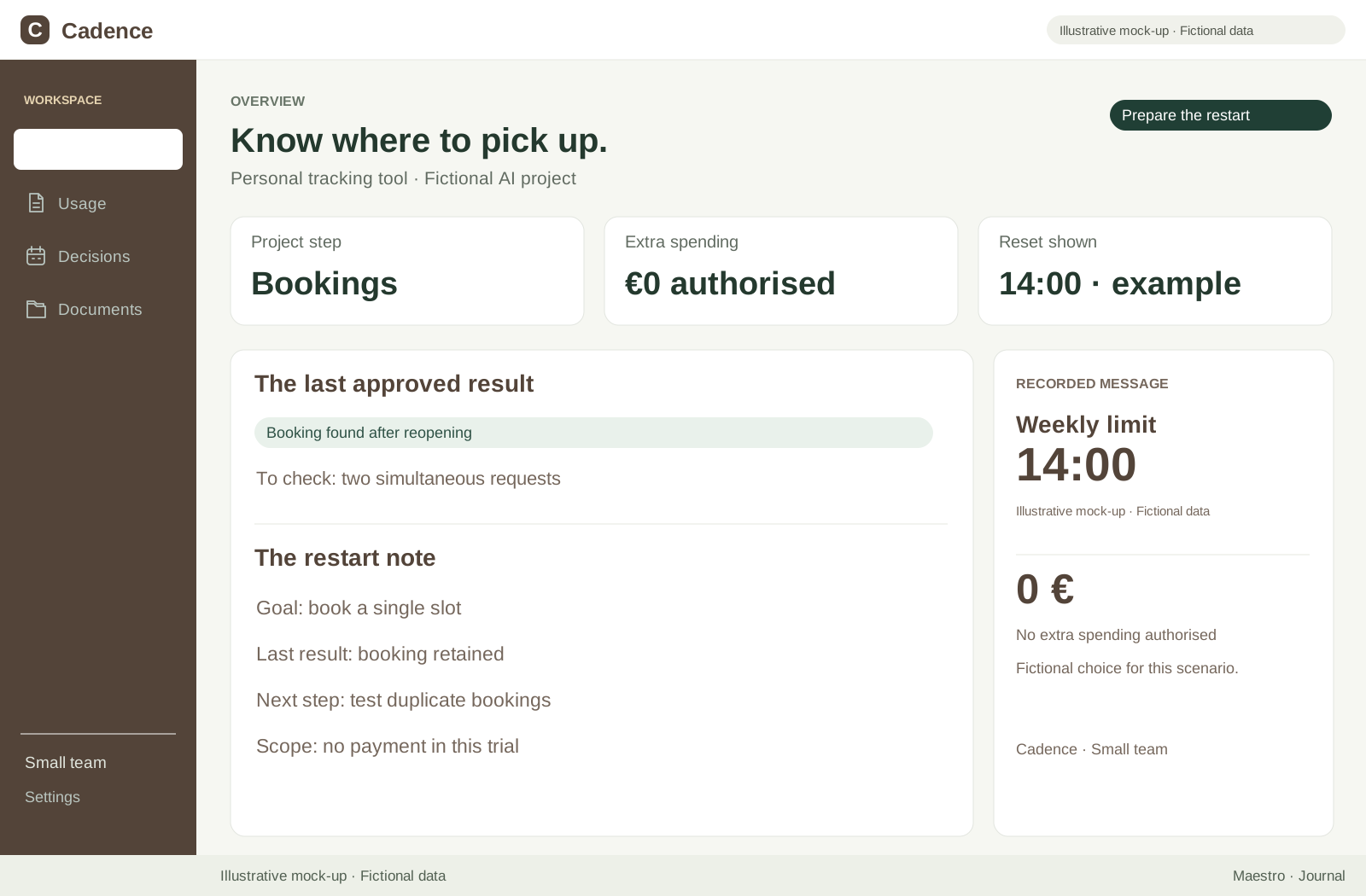
Zoé can already describe the expected result: only one booking should be confirmed, and the other person should receive an explanation. She can also prepare two fictional identities for the test. She makes progress on preparation without describing it as work the assistant has already carried out.
5. Usage credits and API access are separate decisions
Claude usage credits can fund work beyond the included allowance, depending on your access. They are charged separately and have spending and reload settings. Read the usage credit conditions before enabling them.
The API is a separate access method, billed apart from the Claude subscription. The official help page explains this separation between subscriptions and the API. Do not assume that buying credits in one place automatically funds the other.
Before spending, write a bounded authorisation: “Up to €10 extra to finish and check this form, then stop to decide what comes next.” This amount is an example of a personal rule, not an estimate of the task's cost. Check the actual spending controls in the service that bills you.
For Zoé, the answer remains straightforward: her authorised amount is €0. A paid option does not change that decision. If someone does authorise additional spending, the first thing to confirm is where it will be billed, followed by the cap and any automatic reload already enabled.
6. The API has limits of its own
The Claude API applies rate and spending limits. A 429 code can involve request rates or an imposed spending cap, so read the message details. The API limits documentation distinguishes these situations. API access is not unlimited.
If you do not use an API key, this section mainly helps you avoid a rushed purchase. If you do, send the full message to the person managing that account. Avoid changing several settings at once: you would no longer know which change actually restored access.
Available funds cannot explain every interruption. Equally, a block does not automatically justify a larger budget. Record the confirmed cause before increasing an allowance, and keep your initial notes so you can compare the situation after the change.
7. Reading a percentage: the fictional 100, 150, 125 example
Imagine a fictional service with a baseline allowance of 100 units. A temporary period raises it to 150. A new rule then sets it at 125. These numbers describe no current Claude or Anthropic plan and represent neither tokens nor working hours.
- Compared with 100: moving to 125 adds 25 units, an increase of 25%.
- Compared with 150: moving to 125 removes 25 units, a decrease of about 16.7%.
- Both calculations are correct: they use different baselines.
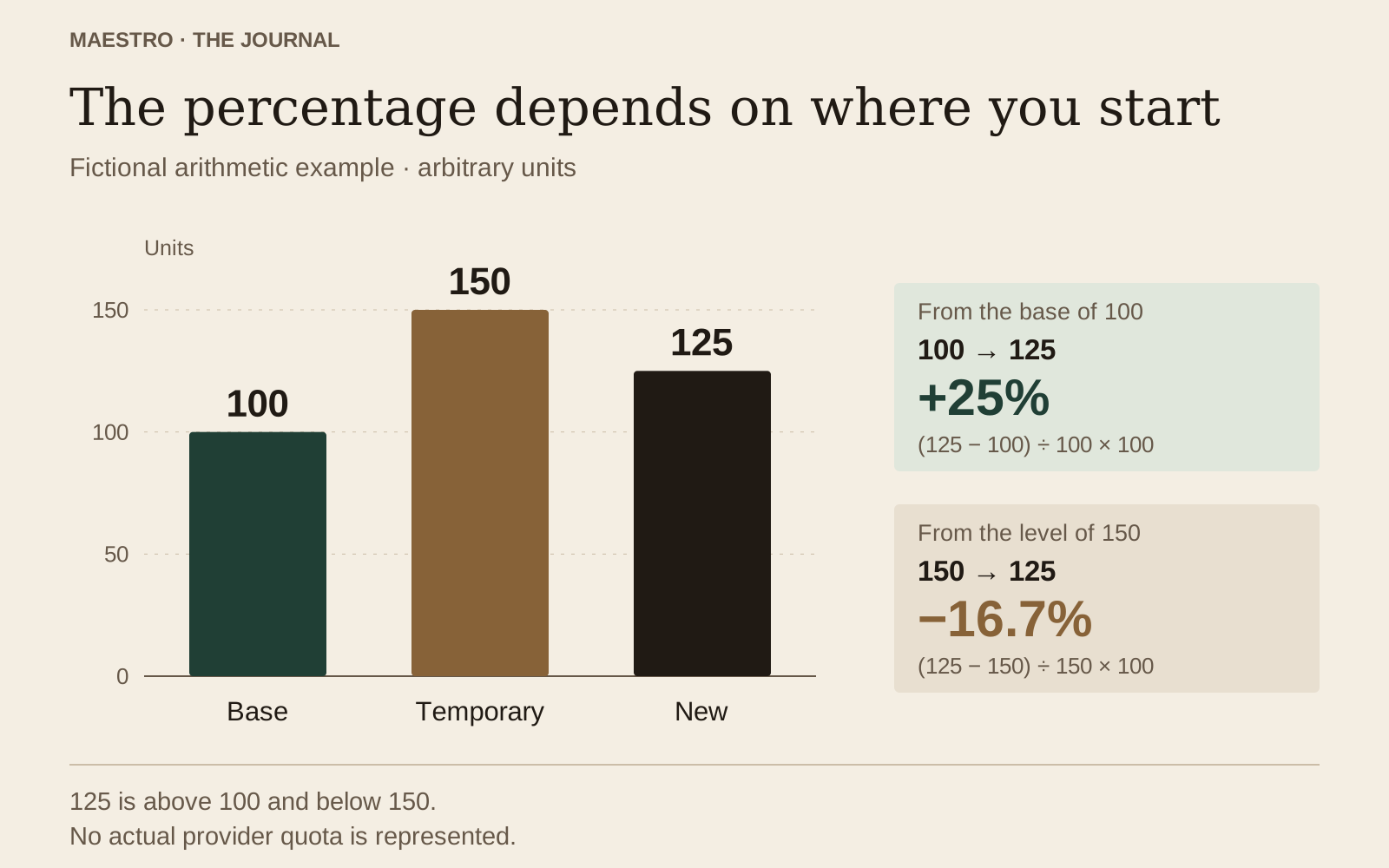
The useful question is therefore “compared with what?” For a real announcement, record the affected plan, effective date, baseline and any temporary conditions. If one of those details is missing, you cannot yet translate the advertised percentage into usable capacity for your project.
The same trap occurs in personal notes. “I used 20% less” does not necessarily mean the tool has become cheaper. You may have done a different task, changed models or looked at a different window. First describe what the numbers are comparing.
8. Compare equivalent periods and results
To examine two sessions, choose an understandable unit of work: for example, “add a required field and check the error messages”. Keep the same definition of the result in your notes. A version that merely appears on screen and one you have actually checked are not equivalent completed work.
Record start and end times, model, billing method, the periods shown by the counters and other known activity on the account. If a window resets between readings, note it. Do not simply subtract two percentages when they no longer share the same starting point.
In our example, Zoé writes “simultaneous-request check prepared but not run”. She therefore does not count it among the day's verified results. When she resumes, she can separate time spent establishing the project's state from time spent performing a new check.
To reconcile counters without mixing up subscription allowances, balances and bills, use our guide to understanding AI usage. Your aim is to connect a cost or interruption to an observed result, while acknowledging the limits of what you could measure.
9. A record to fill in when work stops
Copy this template into a project note. Fill it in with what you know; “unknown” is useful information. It helps you resume and explain the block without pretending to calculate the provider's quota for you.
- Date, time and time zone of the observation: …
- Confirmed account and access method: …
- Exact message and affected period: …
- Displayed reset date, if any: …
- Last completed action and evidence saved: …
- Interrupted action and check still missing: …
- Extra spending authorised and responsible person: …
- Chosen decision and reason: …
- Result observed after resuming: …
Evidence might be a saved test result, a dated screenshot or a precise observation in the application. “It works” is too vague. “After reopening, the fictional booking for the 10 am slot remains visible” describes something another person can check again.
Also record what you have not done. If no real payment has been tested, say so. If the latest change has not been reviewed, note it. This short list prevents the next session from starting with confidence the previous work has not yet earned.
10. Resume with a small check, then decide what comes next
When resuming, read your note and check the project's current state. One possible instruction is: “First inspect the existing files and the last verified result. Then handle only the case of two simultaneous bookings. Report what you observed and what still needs checking.” Adapt it to what actually exists.
Do not erase uncertainty by simply asking the assistant to continue. If files have changed since the interruption, establish those changes before proceeding. Our guide to the risks of building an application with AI explains the checks to plan before relying on an application for real work.
If your needs lead you to reconsider your tool, compare it on a small, clearly defined task with a checkable result. The guide to choosing an assistant and model helps frame that choice. A change of tool needs a specific purpose, authorised access and an identified budget.
Maestro does not bypass providers' quotas or safety rules. Its beta is available by invitation on Mac; the application is free during the beta, while AI costs remain yours to pay. Whatever tool you use, reaching a limit should leave you with a clear task, a verified state and an explicit next decision.
Read the complete guide: build an application without coding