
 By Thomas Cohen, founder of Maestro
Build an app without coding: a guide to your first project
From a need to the first real use: choose an approach, write a brief, plan costs and check the result. A complete example to help you move forward without technical vocabulary.
You want to build an application without knowing how to code. You can arrange screens, have AI build it or get professional help. You still need to define the problem and check the result: an attractive preview is not enough to trust a new tool with your appointments.
This guide follows a fictional example: a small maintenance business wants to organise its service visits. Nora prepares the schedule; Samir works at customers' premises. Requests arrive by phone, then spread across a spreadsheet and messages. We will follow the decisions needed through to the first real use. The people, business and situations are invented to explain the method.
You can keep the free application requirements template open while you read. Copy it into Word or Google Docs without signing up. By the end, you will have a way to prepare a first project, compare approaches to building it and ask for specific help when needed.
1. Describe the problem before drawing the application
Nora initially asks for “an application to manage everything”. That sentence does not help her choose software or assess a delivery. The problem becomes useful when she describes a working day: she reschedules a visit in the spreadsheet, but Samir leaves with the address and time sent in yesterday's message.
The first question is therefore: which information needs to be reliable, for whom and at what moment? Here, Samir needs to find the latest confirmed time before setting out. Nora needs to know a change has been saved. The first goal concerns scheduling; invoicing and stock can wait.
Record the action, obstacle and consequence in your own work. To claim a time saving, first measure the time currently spent. Otherwise, choose an observable success: finding a service visit without asking which file is up to date.
2. Choose between existing software, no-code, AI and a provider
Adopt software that already exists
Start by trying a tool for your trade on the journey you have chosen. Nora asks it to reschedule a visit and show Samir the change. She also checks how to export information and remove someone's access. If this works in the team's actual conditions, a custom application may not be necessary.
Assemble an application in a visual editor
No-code means building with visual elements and rules you configure. You place a list, a form and buttons, then define what happens after an action. This approach may suit you if you enjoy adjusting screens yourself and are willing to learn how the editor works.
Before committing, examine the limits against your actual needs: who can see each visit, what happens without a connection and what can you take away when you leave the service? Being able to export data does not necessarily mean you can run the whole application elsewhere.
Have AI build it
You describe an outcome, the tool proposes an implementation, then you review and correct it. Some tools work in a browser; others work on files on your computer. A conversation can quickly produce a convincing screen, but saving information, permissions and errors still need checking. Our comparison of AI app-building tools helps you examine these differences.
Give a professional some or all of the work
A provider can define the project, build it or review a version prepared with AI. Ask what will be delivered, which checks are included and who handles maintenance. You can combine approaches: prepare the requirements yourself, try a small version with AI, then have the technical parts reviewed before using it with customers.
3. Write a first brief that someone can actually use
A brief describes the project without technical vocabulary. Nora could send the following text to an AI assistant, a software supplier or a developer. Each sentence contains a decision or a question to resolve.
“We organise maintenance visits to our customers. Requests currently arrive by phone. I enter them in a spreadsheet, then send the schedule to the field workers. When a time changes, we do not always know whether the right information has been read. I want a shared place to prepare and find the confirmed schedule.”
“I create a visit with a fictional customer for testing, an address, a date, a time slot and an assigned worker. Samir views the visits assigned to him and marks the ones he has completed. I can change the schedule and correct an assignment. Customers do not have an account in the first version.”
“A cancelled visit remains findable with its status. If I try to assign overlapping visits to the same person, the application must warn me and refuse to save them. If Samir loses his connection, he must understand that the update is not confirmed. We will decide separately whether offline use is necessary.”
“The first version does not handle quotes, payments or stock. We will validate it using fictional data by creating, moving and cancelling a visit. We will also check that a field worker cannot open a colleague's private schedule. Before real use begins, we need to decide where the application runs, who maintains it and how to restore a backup.”
Visit durations and last-minute changes still need clarifying. Keep a “to decide” list with an owner for each answer. The application requirements guide can then help you develop this brief. To check the need before detailing a solution, follow the worked example with Margaux.
4. Limit the first version to one complete journey
The first version needs to provide a service from beginning to end. A login page, a menu and three empty screens are not enough to do the job. For Nora and Samir, the useful journey runs from creating a visit to viewing it and confirming it is complete.
Draw three columns on a sheet: essential now, useful later and excluded. Put creation, assignment, rescheduling, cancellation and viewing in the first. Attachments, directions and statistics can go in the second. Accounting stays excluded until a separate need justifies adding it.
Also decide which devices will be used to try the first journey. Samir reads his schedule on his phone while Nora works on a computer: a screen that feels comfortable to her may be awkward for him. Specify what needs to be read outdoors, which buttons need tapping and which messages need to be understood quickly.
Every request added along the way should answer one question: does its absence prevent this first use? If not, save it for later. If it does, describe what it replaces or adds to the timetable and budget. That keeps the scope small enough to finish and check.
5. Define the data and who is allowed to use it
A form does not decide which information is necessary. For a visit, start with an identifier, location, time, assigned person and status. Describe each field in everyday language. A visit date, a creation date and a last-updated date mean different things.
Next, write down the permissions. “Samir has access to the application” is too vague. Say what he can read, change and export, and which visits this applies to. For the first trials, the rules could be:
- Nora views and organises all the team's visits.
- Samir views only his assigned visits and marks them complete.
- A removed account can no longer view information.
- A visitor without an account cannot open the schedule.
Try these rules with several accounts. OWASP recommends checking permissions on every request. In our example, Samir must fail if he tries to open a visit assigned to a colleague directly. Have the person building the application check this case and keep the result. An external technical review can complement your trials.
Use invented names, addresses and notes at first. Do not copy your customer file to make the demonstration look more realistic. Before using real data, identify the services that will receive it, the people with access and the way it can be removed. The guide to AI development risks explores these precautions further.
6. Ask for a readable plan and approve specific results
Ask for a plan described through outcomes: prepare test data, create a visit, show the schedule, check permissions and verify changes. Specify what you will review: a document, a screen or a successful test. You can then make decisions without understanding every technical task.
A team of AI agents can divide these activities between analysis, design, construction and checking. That does not make their conclusions a guarantee. If an agent says “the tests pass”, ask which behaviours were tried and which parts still need a person to check them.
Maestro organises this work around documents and approvals. Margaux helps define the project, Amélie builds and Félix handles quality checks. Explore the workflow in the Maestro tour. The Mac beta is by invitation; the application is free during this period, with AI usage budgeted separately. The beta guide explains access and how to prepare your first trial.
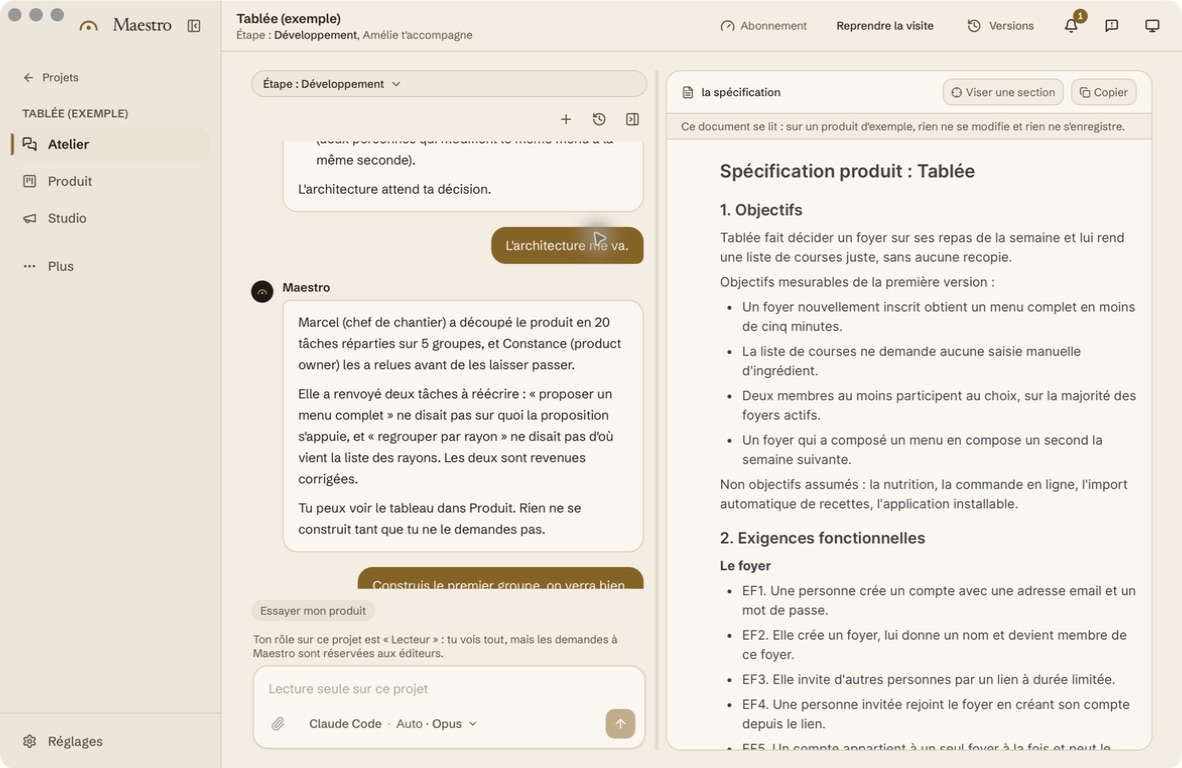
To approve a stage, replace “that looks good” with a verifiable statement: “I moved the visit and Samir can find the new time after reopening his schedule.” Keep any reservations too. An approval can apply to this journey alone; it does not mean the entire application is ready.
7. Choose an assistant and model without starting again
The assistant is the tool you give the work to. The model is the AI engine it uses to understand and produce a response. Depending on the assistant, you can choose that engine or let it choose. The available options and their billing depend on your access to the service.
To begin, choose an assistant you can understand and interrupt. Give it a small task with an outcome you already understand. Watch the quality of its explanations, how it handles an error and what it asks you to approve. The model's name is not enough to choose a way of working.
If you change assistant or model, start with a clear project status: the last working version, approved rules, work in progress, checks already performed and open questions. Ask the new assistant to restate the next task before changing anything. Check that description as you would with a new provider.
Do not change the scope, tool and model at the same time during a trial: you would no longer know what explains the result. Keep the same fictional data and criteria for comparison. An improvement matters only if you can observe it against your own needs. The assistant and model selection guide provides an exercise for comparing two options.
8. Plan the build budget and the cost of using the app
The price of the creation tool does not necessarily cover the project. Separate the spending needed to build from the costs that continue once people use the application. Include your time and that of colleagues who will describe their work, answer questions and carry out trials.
- Building: tool, AI usage, support, technical review and data migration.
- Running: any hosting, domain name, backups and external services.
- Ongoing work: fixing problems, updates and new requests.
- Team time: preparation, approval, training and dealing with incidents.
For each line, note who bills you, what triggers the cost and where to check consumption. A subscription, a usage-based bill and a provider's quote cannot be compared only by their advertised amount. The application budget guide helps you prepare that comparison. The guide to subscriptions, credits and tokens explains how to read AI usage figures.
Agree a spending limit for the first journey and a stopping point. For example, if the schedule still fails to respect permissions after the agreed set of trials, pause additions and request a targeted review. If spending exceeds the agreed allowance, no new feature starts before an explicit decision.
9. Try ordinary situations and awkward ones
Prepare your checks before the demonstration. You will know what to look for instead of following only the route chosen by the tool. For each situation, write a starting point, an action and an expected result. Keep the name of the person who tried it, the date and the version.
The first scenario is simple: Nora creates a fictional visit for Samir. He finds it, marks it complete and Nora sees the new status. Close and reopen the application to check that the information remains. Then try another account: Samir's schedule must not become the whole team's schedule.
- A required field is empty: the application explains what needs completing.
- Two visits overlap: the rule in the brief is respected.
- Nora changes the same appointment in two windows: neither change silently disappears.
- The connection drops during an action: the message does not pretend everything has been saved.
- A visit is cancelled: it remains findable with the correct status.
Also try everyday use on a phone, with a keyboard and with enlarged text. A hard-to-reach button or confusing message can block work as effectively as a calculation error. These proposed checks do not yet prove product quality: you need to run them and record what actually worked.
10. Separate the project on your computer from the app people use
Project files can live on your computer while the final application runs on an online service. Alternatively, an application can be designed for use on a single machine. Where you build does not automatically determine how people will access the result.
In our example, Nora and Samir need shared information on two devices. They must therefore decide how that information is shared, where it is stored and what happens if the service stops responding. A “local” application does not resolve collaboration or synchronisation by itself.
The same distinction applies to AI: keeping a project on your Mac does not mean the model works offline. A connected assistant may send context to its provider. For Maestro, read the data explanations and the chosen assistant's terms before giving it confidential information.
Before making the application available, record who owns the hosting accounts, any domain and service access. Ask how to retrieve the code, data and documents. Taking a project elsewhere requires usable handover material, not simply a folder of files whose contents nobody understands. Our comparison of local and cloud development helps you examine those four locations separately.
11. Move from a trial to the first real use
Choose a limited pilot: a subset of visits, identified users and a period agreed together. Record who can authorise its start and who can stop it. The first real use needs a reachable person in charge; “the AI will handle it” does not name someone to call when the schedule is missing. The guide to building an app for a small team details responsibilities and tests involving several users.
Before starting, check access, any data migration and a backup that someone has actually tried restoring. Have the behaviour during an interruption and the way to report a problem explained. Show Samir how to find his schedule and confirm that a change has been saved.
Decide which tool is authoritative during the transition. If the spreadsheet and application both remain editable without a rule, Nora will have to guess which time to trust. Write down where changes must be made and how to transfer them if the trial stops. The business software replacement guide covers this preparation when a tool already exists.
At the end of the pilot, gather the problems observed and new requests. An access failure or lost information can prevent the next stage. A colour preference can wait. Decide whether to continue, fix issues or return to the previous arrangement using recorded facts, not just enthusiasm from the first demonstration.
12. Plan maintenance and hand over a project people can understand
An application in use keeps needing decisions. Someone must monitor errors, renew services, remove access and organise updates. This could be you or a provider, but the role must be explicit. Also agree what happens if that person becomes unavailable.
Prepare handover material with approved rules, code, startup instructions, the accounts to know about without their passwords and the remaining limitations. Include the test scenarios: they help check that a change does not break something that worked before.
For a new feature, repeat the same cycle on a small scope: problem, rule, construction, trial and decision. If Nora later asks for automatic reminders, you will need to specify who receives them, when and how a failed delivery is detected. That request deserves its own journey; it is more than adding a button.
Start with the six questions in the application requirements template, then have a future user review the answers. You can try existing software, build or get help with a clear requirement and criteria for judging the result.
Read the complete guide: build an application without coding