
 By Thomas Cohen, founder of Maestro
Custom software or SaaS: comparing the cost over five years
The cheaper option depends on the features you need, the people using the software and the work involved. A fictional five-year example compares invoices, your team’s time and the cost of switching.
A subscription that is easy to start can become expensive as your team grows. Custom software may need substantial work before it does anything useful. To choose, compare the same use case, then count both what you will pay and what will occupy your team. The figure on a pricing page does not answer both questions.
This guide follows a fictional five-person business organising service visits. Nadia schedules appointments and Karim leads the team. We compare online subscription software, or SaaS, with a tool built for them. Every amount, timescale and quantity below is an illustrative assumption, not a market price or a quote for your project.
1. Compare the same work before comparing prices
Nadia needs to find a request, assign a visit, report a postponement and pass information back afterwards. Invoicing stays in the existing software. Both solutions must support these same actions, with the same access permissions and documents available for export. A cheaper offer that leaves out postponing a visit does not yet cover the requirement.
Prepare a fictional case and follow the same workflow in each solution. Record what works, what needs a paid option and what remains manual. Do not assume a feature will be easy to add because a salesperson or an AI agent describes it convincingly. Ask how its behaviour will be checked.
In our example, both options are considered usable after this trial. That assumption lets us compare costs; it does not prove that two real offers are equivalent. The guide to choosing software for a trade business offers a practical starting point for preparing your own trials.
2. Set assumptions that everyone can review
We use five full years, or sixty months. The team has five users throughout the base scenario. All invoiced amounts are in euros excluding VAT, with no price increases, financing costs or discounting. This is an addition of comparable costs, not a complete financial forecast.
The scenario includes a defined change in year three and an exit in year five. Here, “exit” means obtaining and checking the handover materials needed to continue elsewhere; the price of the next software is excluded. Apply this same boundary to both options so that one column does not receive an artificial advantage.
Record who supplied each figure: a public price, a quote, a provider’s answer or an internal estimate. Distinguish “included in the contract” from “we think it will be included”. An unknown amount should remain a visible question. Replacing it with zero makes the total look more precise than it is.
3. Calculate spending on the subscription software
The fictional offer costs €25 per person per month, plus €20 in monthly options for the whole team. Getting started includes €500 for setup and €800 for data migration. We assume hosting, routine support and updates are included in the subscription; check that in your own offer.
- Subscriptions: 5 people × €25 × 60 months = €7,500.
- Options: €20 × 60 months = €1,200.
- Setup and data migration: €500 + €800 = €1,300.
- Configuration of a new workflow in year three: €700.
- Preparing and checking the exit in year five: €600.
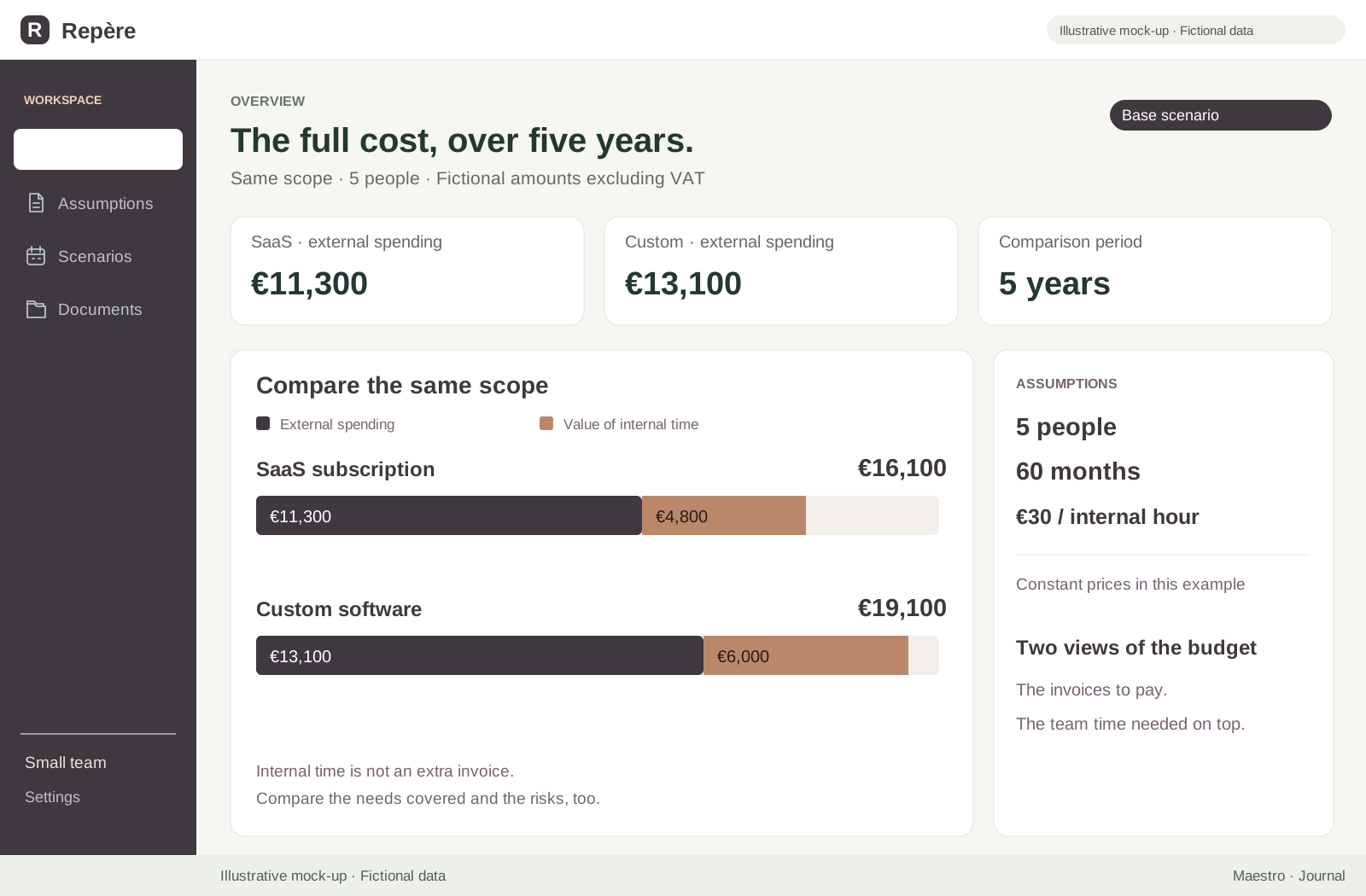
The total is €11,300 over five years. The €700 change is commissioned work to adapt a workflow, separate from the included updates. The exit cost is a hypothetical service charge; it is not a claim about software vendors’ practices.
Also look at when you pay: €3,040 in year one, €1,740 in year two, €2,440 in year three, €1,740 in year four and €2,340 in year five. These amounts assume the monthly subscription described above. An annual discount may change the total, but also the amount payable upfront and the terms for leaving.
4. Count what comes after the custom build
The fictional quote includes €6,000 for development, €800 for data migration and €500 for deployment. Running costs are €25 per month for hosting and €600 per year for maintenance. That €600 is an assumption to break down, not a recommended percentage of the development price.
- Development, migration and deployment: €6,000 + €800 + €500 = €7,300.
- Hosting: €25 × 60 months = €1,500.
- Maintenance: €600 × 5 years = €3,000.
- New feature in year three: €700.
- Preparing and checking the exit in year five: €600.
The total is €13,100. As with SaaS, the added feature is assumed to meet the same need. We give it the same cost in this simulation to isolate the other differences. Real quotes offer no guarantee of this equality: keep the amounts proposed and compare what they include.
The annual breakdown is €8,200, then €900, €1,600, €900 and €1,500. The five-year total therefore hides a much larger initial outlay. Check the payment dates and the deliverable expected at each one. Being able to fund the first stage matters even when a project looks worthwhile in the long term.
5. Include your team’s time without counting it twice
In the SaaS scenario, we allow thirty internal hours at the start: preparation, data cleaning, testing and learning the tool. Add two hours per month to administer it and handle routine questions, four hours to check the change and six hours for the exit. That gives 30 + 120 + 4 + 6 = 160 hours.
For custom software, we allow seventy hours at the start, because Nadia and Karim must also specify and test the rules being built. The other items stay the same: 70 + 120 + 4 + 6 = 200 hours. The external migration services do not include these internal preparation and validation hours.
At a fictional internal value of €30 per hour, the time represents €4,800 for SaaS and €6,000 for custom software. The economic cost therefore becomes €16,100 versus €19,100. This valuation makes the effort visible; it assumes neither paid overtime nor a new hire.
6. Recalculate both columns if the team grows to ten
Now suppose five colleagues join at the start of year three, for the remaining thirty-six months. In SaaS, the extra licences cost 5 × €25 × 36 = €4,500. We add €300 for external training. Options stay at €20 per month under this assumption: if their price changes with team size, change that line too.
The custom software does not stay at its previous price. We assume an extra €800 adaptation, separate from the change already planned, and the same €300 of external training. Hosting rises from €25 to €50 per month, adding €900 over thirty-six months. Maintenance rises from €600 to €900 per year, adding €900 over three years.
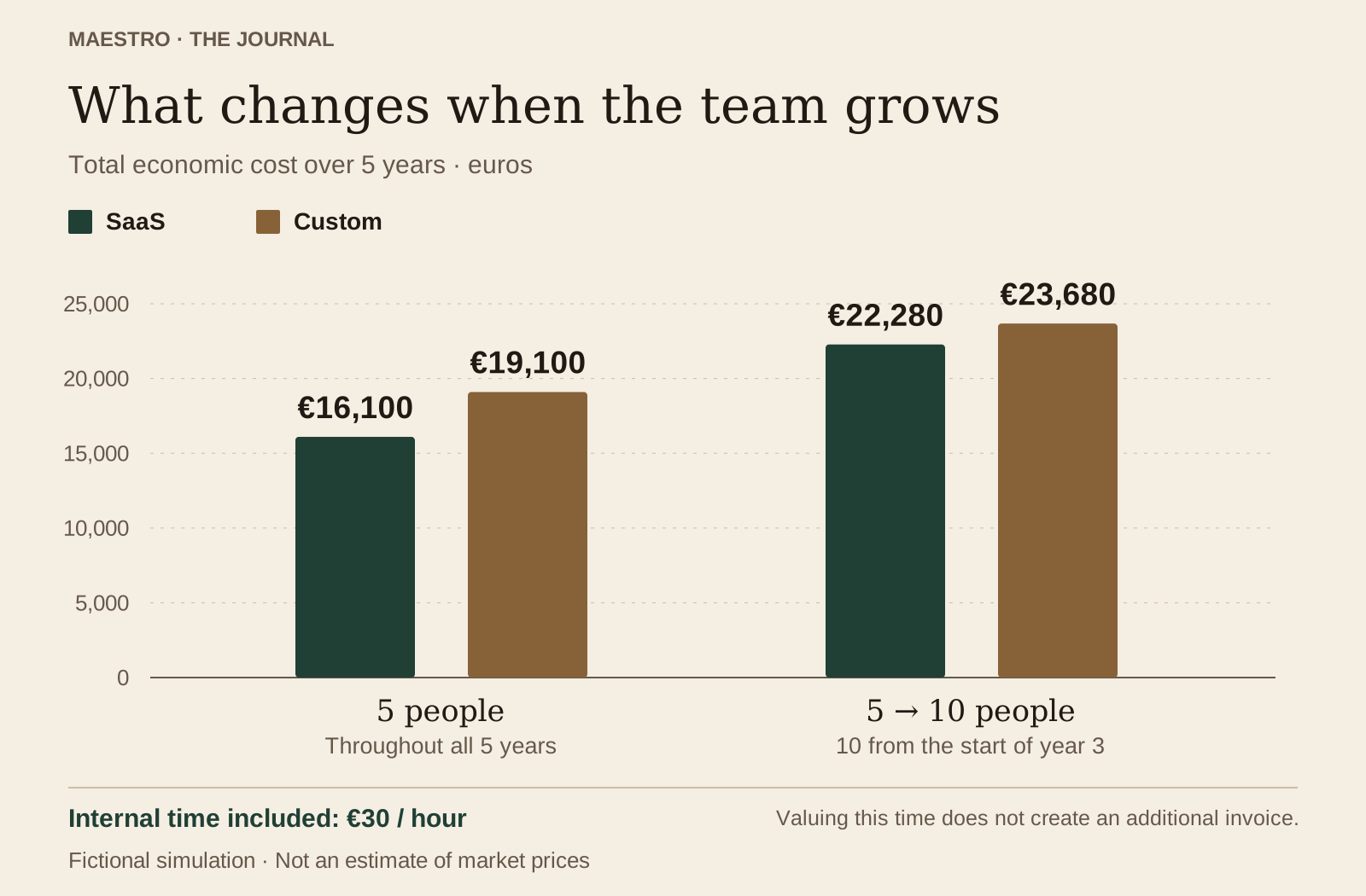
External spending becomes €16,100 for SaaS: €11,300 + €4,500 + €300. For custom software, it reaches €16,000: €13,100 + €800 + €300 + €900 + €900. Custom software now appears €100 cheaper when looking only at invoices.
Recalculate internal time as well. Both options need ten hours of familiarisation and one additional hour of administration per month for thirty-six months. Custom software also needs ten hours to check the adaptation. The totals become 206 hours for SaaS and 256 hours for custom software.
At €30 per hour, that represents €6,180 and €7,680 in time respectively. The economic cost reaches €22,280 for SaaS and €23,680 for custom software. In this example, saving €100 on invoices does not offset the additional work. Different assumptions could reverse the result.
7. Clarify maintenance, changes and leaving
An annual amount does not tell you what you can ask for. Distinguish a fault, a necessary update, a usage question and a new feature. Ask who will intervene, when and how work outside the agreement will be priced. “Maintenance included” does not mean “every future request included”.
For both options, check what happens when a connection to another service changes or a key person becomes unavailable. Have the maintenance scope reviewed for custom software. For SaaS, ask which usage limits, options or services could change the bill. Do not add a contingency percentage to conceal a question the provider could answer.
Prepare a practical exit too. Which files will you receive? Who will check attachments, relationships between records and the rights needed to continue? Being able to download an archive does not prove that someone else can take over the service. The guide to code ownership and handover helps separate these questions.
8. Compare the work delivered, not just the total
A more expensive tool may solve a problem that the other leaves untouched. You still need to show which problem. In our fictional business, Nadia records the time spent organising visits, handover errors and rework before and during the trial. She compares sufficiently similar days and keeps a record of the difficulties observed.
If a solution saves fifteen minutes per working day, two hundred days would represent fifty hours a year. That is an illustrative calculation, not an observed benefit. Those hours may support better work without reducing payroll. Do not automatically present them as money saved, and do not use the same benefit to distinguish two solutions that both deliver it.
Dependency matters too: can you continue if the provider stops working, the subscription price rises or an export becomes necessary? A weakness in an essential requirement may justify rejecting an otherwise cheaper option. The decision should state which risk you accept, who monitors it and what would make you reconsider.
9. Fill in your own comparison sheet
Copy the headings below into a document or spreadsheet. Keep one column per option and one row per cost item. Attach a period, a source and the included work to each amount. A one-off expense should not become monthly simply because the columns are poorly labelled.
- Work to cover: people, essential actions and excluded features.
- Getting started: preparation, setup or development, migration, testing and training.
- Running costs: subscription, options, hosting, maintenance and support.
- Planned changes: date, requested work and price to confirm.
- Exit: export, checking, handover and any period running both tools.
- Internal time: hours per stage and the valuation method.
- Uncertainties: unknown amount, person to ask and evidence required.
First calculate external spending year by year, then its total. Add the value of internal time as a separate result. Next, work through a plausible change: more people, an additional need or an early exit. Adjust both options where relevant and explain each new assumption.
10. Keep the same questions when building with AI
AI changes how some of the work is done, not the costs you need to examine. Include its subscription or usage charges, corrections, testing, production hosting and maintenance. Do not add a second estimate for usage already included in a plan. The application budget guide helps break down these items.
Maestro can help you describe the need and follow a build in stages. The invitation-only beta is available on Mac, with the application free and AI usage charged separately. That fixes neither the cost of a finished tool nor the time you will spend checking it. Use a first trial to record your own consumption and the interventions still required.
For Nadia and Karim, the next step is to confirm three things: the features actually covered, the uncertain price items and the maintenance responsibilities. They can then choose a solution with an explainable budget and a way to leave. A total helps you decide when you know what it counts, what remains open and what work it enables.
Compare alternatives to Lovable: pricing, code and local workflows